 # Bullet Train for oh-my-zsh  [](https://bullet-train-zsh-slack.herokuapp.com/)
Bullet Train is a [oh-my-zsh shell](https://github.com/robbyrussell/oh-my-zsh)
theme based on the
[Powerline Vim plugin](https://github.com/Lokaltog/vim-powerline). It aims for
simplicity, showing information only when it's relevant.
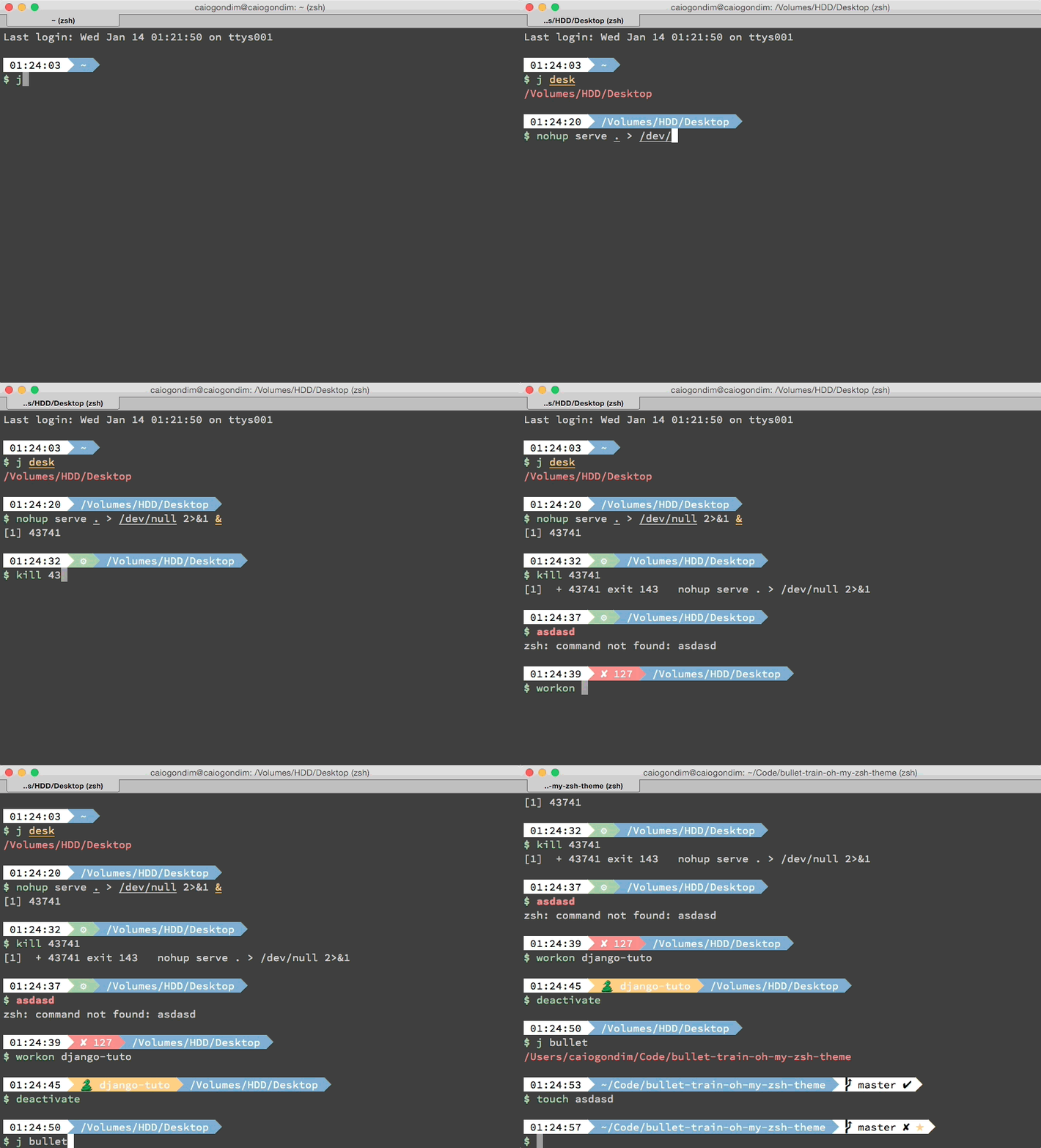
It currently shows:
- Current Python virtualenv; when using Pyenv and no active virtualenv shows the current Python version the shell uses
- Current Ruby version using chruby; version and gemset when on RVM or Rbenv
- Current Node.js version, through NVM
- Current Perl version using plenv
- Git status
- Timestamp
- Current directory
- Background jobs
- Exit code of last command
If you want add some new feature, of fix some bug, open an issue and lets hack
together.
For a tmux theme to work with it, i suggest [Maglev](https://github.com/caiogondim/maglev).
## Preview
## Other color schemes
It's better to use Bullet Train with a dark background color scheme. Below you
can check Bullet Train with some popular dark color schemes.
### Solarized Dark

### Monokai

### Tomorrow Night Eighties

### Tomorrow Night Bright

## Requirements
In order to use the theme, you will first need:
* Powerline compatible fonts like [Vim Powerline patched fonts](https://github.com/Lokaltog/powerline-fonts), [Input Mono](http://input.fontbureau.com/) or [Monoid](http://larsenwork.com/monoid/).
* On Ubuntu like systems you'll need the `ttf-ancient-fonts` package to correctly display some unicode symbols that are not covered by the Powerline fonts above.
* A ZSH framework like [antigen](https://github.com/zsh-users/antigen), [oh-my-zsh](https://github.com/robbyrussell/oh-my-zsh) or [zgen](https://github.com/tarjoilija/zgen)
* Make sure terminal is using 256-colors mode with `export TERM="xterm-256color"`
* For [iTerm 2](http://iterm2.com/) users, make sure you go into your settings and set both the regular font and the non-ascii font to powerline compatible [fonts](https://github.com/powerline/fonts) or the prompt separators and special characters will not display correctly.
## Installing
### For oh-my-zsh users
1. Download the theme [here](http://raw.github.com/caiogondim/bullet-train-oh-my-zsh-theme/master/bullet-train.zsh-theme)
2. Put the file **bullet-train.zsh-theme** in **$ZSH_CUSTOM/themes/**
3. Configure the theme in your **~/.zshrc** file:
```bash
ZSH_THEME="bullet-train"
```
### For antigen users
Add the following snippet to your **.zshrc** somewhere after the line
`antigen use oh-my-zsh`.
```bash
antigen theme https://github.com/caiogondim/bullet-train-oh-my-zsh-theme bullet-train
```
### For Zgen users
If you're using [zgen](https://github.com/tarjoilija/zgen), add the following line to your **~/.zshrc** where you're adding your other zsh plugins **after** the line `zgen oh-my-zsh`.
```bash
zgen load caiogondim/bullet-train-oh-my-zsh-theme bullet-train
```
## Options
Bullet Train is configurable. You can change colors and which segments you want
or don't want to see. All options must be overridden in your **.zshrc** file.
### Order
`BULLETTRAIN_PROMPT_ORDER` defines order of prompt segments. Use zsh array
syntax to specify your own order, e.g:
```bash
BULLETTRAIN_PROMPT_ORDER=(
git
context
dir
time
)
```
NOTE: You do not need to specify *end* segment - it will be added automatically.
With this you can also specify custom segments, please see [Tips](#tips) for
more details.
### Prompt
|Variable|Default|Meaning
|--------|-------|-------|
|`BULLETTRAIN_PROMPT_CHAR`|`\$`|Character to be show before any command
|`BULLETTRAIN_PROMPT_ROOT`|`true`|Highlight if running as root
|`BULLETTRAIN_PROMPT_SEPARATE_LINE`|`true`|Make the prompt span across two lines
|`BULLETTRAIN_PROMPT_ADD_NEWLINE`|`true`|Adds a newline character before each prompt line
### Status
|Variable|Default|Meaning
|--------|-------|-------|
|`BULLETTRAIN_STATUS_SHOW`|`true`|Show/hide that segment
|`BULLETTRAIN_STATUS_EXIT_SHOW`|`false`|Show/hide exit code of last command
|`BULLETTRAIN_STATUS_BG`|`green`|Background color
|`BULLETTRAIN_STATUS_ERROR_BG`|`red`|Background color of segment when last command exited with an error
|`BULLETTRAIN_STATUS_FG`|`black`|Foreground color
### Time
|Variable|Default|Meaning
|--------|-------|-------|
|`BULLETTRAIN_TIME_SHOW`|`true`|Show/hide that segment
|`BULLETTRAIN_TIME_12HR`|`false`|Format time using 12-hour clock (am/pm)
|`BULLETTRAIN_TIME_BG`|`''`|Background color
|`BULLETTRAIN_TIME_FG`|`''`|Foreground color
### Custom
|Variable|Default|Meaning
|--------|-------|-------|
|`BULLETTRAIN_CUSTOM_MSG`|`false`|Free segment you can put a custom message
|`BULLETTRAIN_CUSTOM_BG`|`black`|Background color
|`BULLETTRAIN_CUSTOM_FG`|`black`|Foreground color
### Context
|Variable|Default|Meaning
|--------|-------|-------|
|`BULLETTRAIN_CONTEXT_SHOW`|`false`|Show/hide that segment
|`BULLETTRAIN_CONTEXT_BG`|`black`|Background color
|`BULLETTRAIN_CONTEXT_FG`|`default`|Foreground color
|`BULLETTRAIN_CONTEXT_DEFAULT_USER`|none|Default user. If you are running with other user other than default, the segment will be showed.
|`BULLETTRAIN_CONTEXT_HOSTNAME`|`%m`|Hostname. Set %M to display the full qualified domain name.
|`BULLETTRAIN_IS_SSH_CLIENT`|none|If `true`, the segment will be showed.
### Python virtualenv (+Pyenv)
|Variable|Default|Meaning
|--------|-------|-------|
|`BULLETTRAIN_VIRTUALENV_SHOW`|`true`|Show/hide that segment
|`BULLETTRAIN_VIRTUALENV_BG`|`yellow`|Background color
|`BULLETTRAIN_VIRTUALENV_FG`|`white`|Foreground color
|`BULLETTRAIN_VIRTUALENV_PREFIX`|`🐍`|Prefix of the segment
### node.js nvm
|Variable|Default|Meaning
|--------|-------|-------|
|`BULLETTRAIN_NVM_SHOW`|`false`|Show/hide that segment
|`BULLETTRAIN_NVM_BG`|`green`|Background color
|`BULLETTRAIN_NVM_FG`|`white`|Foreground color
|`BULLETTRAIN_NVM_PREFIX`|`"⬡ "`|Prefix of the segment
### Ruby RVM/Rbenv
|Variable|Default|Meaning
|--------|-------|-------|
|`BULLETTRAIN_RUBY_SHOW`|`true`|Show/hide that segment
|`BULLETTRAIN_RUBY_BG`|`magenta`|Background color
|`BULLETTRAIN_RUBY_FG`|`white`|Foreground color
|`BULLETTRAIN_RUBY_PREFIX`|`"♦"`|Prefix of the segment
### Go
|Variable|Default|Meaning
|--------|-------|-------|
|`BULLETTRAIN_GO_SHOW`|`false`|Show/hide that segment
|`BULLETTRAIN_GO_BG`|`green`|Background color
|`BULLETTRAIN_GO_FG`|`white`|Foreground color
|`BULLETTRAIN_GO_PREFIX`|`go`|Prefix of the segment
### Perl
|Variable|Default|Meaning
|--------|-------|-------|
|`BULLETTRAIN_PERL_SHOW`|`false`|Show/hide that segment
|`BULLETTRAIN_PERL_BG`|`yellow`|Background color
|`BULLETTRAIN_PERL_FG`|`black`|Foreground color
|`BULLETTRAIN_PERL_PREFIX`|`🐪`|Prefix of the segment
### Dir
|Variable|Default|Meaning
|--------|-------|-------|
|`BULLETTRAIN_DIR_SHOW`|`true`|Show/hide that segment
|`BULLETTRAIN_DIR_BG`|`blue`|Background color
|`BULLETTRAIN_DIR_FG`|`white`|Foreground color
|`BULLETTRAIN_DIR_CONTEXT_SHOW`|`false`|Show user and machine in an SCP formatted style
|`BULLETTRAIN_DIR_EXTENDED`|`1`|Extended path (0=short path, 1=medium path, 2=complete path, everything else=medium path)
### Git
|Variable|Default|Meaning
|--------|-------|-------|
|`BULLETTRAIN_GIT_SHOW`|`true`|Show/hide that segment
|`BULLETTRAIN_GIT_COLORIZE_DIRTY`|`false`|Set `BULLETTRAIN_GIT_BG` to `BULLETTRAIN_GIT_COLORIZE_DIRTY_COLOR` in dirty state
|`BULLETTRAIN_GIT_COLORIZE_DIRTY_BG_COLOR`|`yellow`|`BULLETTRAIN_GIT_BG` in dirty state
|`BULLETTRAIN_GIT_COLORIZE_DIRTY_FG_COLOR`|`black`|`BULLETTRAIN_GIT_FG` in dirty state
|`BULLETTRAIN_GIT_BG`|`white`|Background color
|`BULLETTRAIN_GIT_FG`|`black`|Foreground color
|`BULLETTRAIN_GIT_PROMPT_CMD`|`git_prompt_info`|Function to display details about your git segment.
|`BULLETTRAIN_GIT_EXTENDED`|`true`|
|`BULLETTRAIN_GIT_PREFIX`|`""`|Prefix
|`BULLETTRAIN_GIT_SUFFIX`|`""`|Suffix
|`BULLETTRAIN_GIT_DIRTY`|`"✘"`|Icon for dirty state
|`BULLETTRAIN_GIT_CLEAN`|`"✔"`|Icon for clean state
|`BULLETTRAIN_GIT_ADDED`|`"%F{green}✚%F{black}"`|Icon for added files on stage
|`BULLETTRAIN_GIT_MODIFIED`|`"%F{blue}✹%F{black}"`|Icon for modified files
|`BULLETTRAIN_GIT_DELETED`|`"%F{red}✖%F{black}"`|Icon for delete files on stage
|`BULLETTRAIN_GIT_UNTRACKED`|`"%F{yellow}✭%F{black}"`|Icon for untracked files
|`BULLETTRAIN_GIT_RENAMED`|`"➜"`|Icon for renamed
|`BULLETTRAIN_GIT_UNMERGED`|`"═"`|Icon for unmerged state
|`BULLETTRAIN_GIT_AHEAD`|`" ⬆"`|Icon for ahead state from remote
|`BULLETTRAIN_GIT_BEHIND`|`" ⬇"`|Icon for behind state from remote
|`BULLETTRAIN_GIT_DIVERGED`|`" ⬍"`|Icon for diverged state from remote
### Mercurial/HG
|Variable|Default|Meaning
|--------|-------|-------|
|`BULLETTRAIN_HG_SHOW`|`true`|Show/hide that segment
### Command execution time
|Variable|Default|Meaning
|--------|-------|-------|
|`BULLETTRAIN_EXEC_TIME_SHOW`|`false`|Show/hide that segment
|`BULLETTRAIN_EXEC_TIME_ELAPSED`|5|Elapsed time of command execution
|`BULLETTRAIN_EXEC_TIME_BG`|`yellow`|Background color
|`BULLETTRAIN_EXEC_TIME_FG`|`black`|Foreground color
## Tips
### BULLETTRAIN_PROMPT_ORDER
This gives ability to customize order and put user-defined segment on prompt.
```bash
prompt_say_hello() {
prompt_segment yellow blue "hello"
}
BULLETTRAIN_PROMPT_ORDER=(
git
dir
say_hello
)
```

### BULLETTRAIN_GIT_PROMPT_CMD
Allows you to specify custom git prompt command. This makes it possible to
change:

into:

with:
``` bash
BULLETTRAIN_GIT_PROMPT_CMD=\${\$(git_prompt_info)//\\//\ \ }
```
Please note we need to delay variable expansion, so we have to escape all
**weird** character - *$*, *\*, *\*, etc.
You can also use function to get more complex commands:
``` bash
BULLETTRAIN_GIT_PROMPT_CMD="\$(custom_git_prompt)"
custom_git_prompt() {
prompt=$(git_prompt_info)
prompt=${prompt//\//\ \ }
prompt=${prompt//_/\ }
echo ${prompt}
}
```
which gives:

## Contributors
That project was originally a fork from
[Powerline](https://github.com/jeremyFreeAgent/oh-my-zsh-powerline-theme), but
most of the code was later erased and its now more closely related to
[Agnoster](https://gist.github.com/agnoster/3712874). Below is a `git summary`
of the project:
```
124 Caio Gondim
33 Jérémy Romey
14 Greg Fitzgerald
8 Dan Kaplun
7 Jocelyn Mallon
6 Joe Block
6 Viktor (Icon) VAD
6 Jérémy Romey
5 Arthur Wang
4 Flavius Aspra
3 Michael Cornell
3 Mario Zigliotto
2 Charlie Smith
2 itsZero (Chien-An Cho)
2 wujtruj
1 Sébastien Bordenave
1 gvillalta99
1 illuminatis
1 krischer
1 m.kuehn
1 timfeirg
1 Adrien Brault
1 yachi
1 Andreas Galauner
1 Fabio Poloni
1 Guillaume BINET
1 Hannes Frank
1 Heng-Yi Wu
1 Jack Chu
1 KVoll
1 Kevin
1 Manuel Hoffmann
1 Marius Krämer
1 Maxime Bruguet
1 Mertcan Mermerkaya
1 Michael Robinson
1 Nicholas
```
## Credits
This theme is highly inspired by the following themes:
- [Powerline](https://github.com/jeremyFreeAgent/oh-my-zsh-powerline-theme)
- [Agnoster](https://gist.github.com/agnoster/3712874)
## Donating
If you found this project useful and are willing to donate, transfer some
bitcoins to `1BqqKiZA8Tq43CdukdBEwCdDD42jxuX9UY` or through the
[URL](https://www.coinbase.com/caiogondim) https://www.coinbase.com/caiogondim
Or via [PayPal.me](https://www.paypal.me/caiogondim) https://www.paypal.me/caiogondim.
## License
The MIT License (MIT)
Copyright (c) 2014-2015 [Caio Gondim](http://caiogondim.com)
Permission is hereby granted, free of charge, to any person obtaining a copy
of this software and associated documentation files (the "Software"), to deal
in the Software without restriction, including without limitation the rights
to use, copy, modify, merge, publish, distribute, sublicense, and/or sell
copies of the Software, and to permit persons to whom the Software is
furnished to do so, subject to the following conditions:
The above copyright notice and this permission notice shall be included in all
copies or substantial portions of the Software.
THE SOFTWARE IS PROVIDED "AS IS", WITHOUT WARRANTY OF ANY KIND, EXPRESS OR
IMPLIED, INCLUDING BUT NOT LIMITED TO THE WARRANTIES OF MERCHANTABILITY,
FITNESS FOR A PARTICULAR PURPOSE AND NONINFRINGEMENT. IN NO EVENT SHALL THE
AUTHORS OR COPYRIGHT HOLDERS BE LIABLE FOR ANY CLAIM, DAMAGES OR OTHER
LIABILITY, WHETHER IN AN ACTION OF CONTRACT, TORT OR OTHERWISE, ARISING FROM,
OUT OF OR IN CONNECTION WITH THE SOFTWARE OR THE USE OR OTHER DEALINGS IN THE
SOFTWARE.
# Bullet Train for oh-my-zsh  [](https://bullet-train-zsh-slack.herokuapp.com/)
Bullet Train is a [oh-my-zsh shell](https://github.com/robbyrussell/oh-my-zsh)
theme based on the
[Powerline Vim plugin](https://github.com/Lokaltog/vim-powerline). It aims for
simplicity, showing information only when it's relevant.
It currently shows:
- Current Python virtualenv; when using Pyenv and no active virtualenv shows the current Python version the shell uses
- Current Ruby version using chruby; version and gemset when on RVM or Rbenv
- Current Node.js version, through NVM
- Current Perl version using plenv
- Git status
- Timestamp
- Current directory
- Background jobs
- Exit code of last command
If you want add some new feature, of fix some bug, open an issue and lets hack
together.
For a tmux theme to work with it, i suggest [Maglev](https://github.com/caiogondim/maglev).
## Preview

## Other color schemes
It's better to use Bullet Train with a dark background color scheme. Below you
can check Bullet Train with some popular dark color schemes.
### Solarized Dark

### Monokai

### Tomorrow Night Eighties

### Tomorrow Night Bright

## Requirements
In order to use the theme, you will first need:
* Powerline compatible fonts like [Vim Powerline patched fonts](https://github.com/Lokaltog/powerline-fonts), [Input Mono](http://input.fontbureau.com/) or [Monoid](http://larsenwork.com/monoid/).
* On Ubuntu like systems you'll need the `ttf-ancient-fonts` package to correctly display some unicode symbols that are not covered by the Powerline fonts above.
* A ZSH framework like [antigen](https://github.com/zsh-users/antigen), [oh-my-zsh](https://github.com/robbyrussell/oh-my-zsh) or [zgen](https://github.com/tarjoilija/zgen)
* Make sure terminal is using 256-colors mode with `export TERM="xterm-256color"`
* For [iTerm 2](http://iterm2.com/) users, make sure you go into your settings and set both the regular font and the non-ascii font to powerline compatible [fonts](https://github.com/powerline/fonts) or the prompt separators and special characters will not display correctly.
## Installing
### For oh-my-zsh users
1. Download the theme [here](http://raw.github.com/caiogondim/bullet-train-oh-my-zsh-theme/master/bullet-train.zsh-theme)
2. Put the file **bullet-train.zsh-theme** in **$ZSH_CUSTOM/themes/**
3. Configure the theme in your **~/.zshrc** file:
```bash
ZSH_THEME="bullet-train"
```
### For antigen users
Add the following snippet to your **.zshrc** somewhere after the line
`antigen use oh-my-zsh`.
```bash
antigen theme https://github.com/caiogondim/bullet-train-oh-my-zsh-theme bullet-train
```
### For Zgen users
If you're using [zgen](https://github.com/tarjoilija/zgen), add the following line to your **~/.zshrc** where you're adding your other zsh plugins **after** the line `zgen oh-my-zsh`.
```bash
zgen load caiogondim/bullet-train-oh-my-zsh-theme bullet-train
```
## Options
Bullet Train is configurable. You can change colors and which segments you want
or don't want to see. All options must be overridden in your **.zshrc** file.
### Order
`BULLETTRAIN_PROMPT_ORDER` defines order of prompt segments. Use zsh array
syntax to specify your own order, e.g:
```bash
BULLETTRAIN_PROMPT_ORDER=(
git
context
dir
time
)
```
NOTE: You do not need to specify *end* segment - it will be added automatically.
With this you can also specify custom segments, please see [Tips](#tips) for
more details.
### Prompt
|Variable|Default|Meaning
|--------|-------|-------|
|`BULLETTRAIN_PROMPT_CHAR`|`\$`|Character to be show before any command
|`BULLETTRAIN_PROMPT_ROOT`|`true`|Highlight if running as root
|`BULLETTRAIN_PROMPT_SEPARATE_LINE`|`true`|Make the prompt span across two lines
|`BULLETTRAIN_PROMPT_ADD_NEWLINE`|`true`|Adds a newline character before each prompt line
### Status
|Variable|Default|Meaning
|--------|-------|-------|
|`BULLETTRAIN_STATUS_SHOW`|`true`|Show/hide that segment
|`BULLETTRAIN_STATUS_EXIT_SHOW`|`false`|Show/hide exit code of last command
|`BULLETTRAIN_STATUS_BG`|`green`|Background color
|`BULLETTRAIN_STATUS_ERROR_BG`|`red`|Background color of segment when last command exited with an error
|`BULLETTRAIN_STATUS_FG`|`black`|Foreground color
### Time
|Variable|Default|Meaning
|--------|-------|-------|
|`BULLETTRAIN_TIME_SHOW`|`true`|Show/hide that segment
|`BULLETTRAIN_TIME_12HR`|`false`|Format time using 12-hour clock (am/pm)
|`BULLETTRAIN_TIME_BG`|`''`|Background color
|`BULLETTRAIN_TIME_FG`|`''`|Foreground color
### Custom
|Variable|Default|Meaning
|--------|-------|-------|
|`BULLETTRAIN_CUSTOM_MSG`|`false`|Free segment you can put a custom message
|`BULLETTRAIN_CUSTOM_BG`|`black`|Background color
|`BULLETTRAIN_CUSTOM_FG`|`black`|Foreground color
### Context
|Variable|Default|Meaning
|--------|-------|-------|
|`BULLETTRAIN_CONTEXT_SHOW`|`false`|Show/hide that segment
|`BULLETTRAIN_CONTEXT_BG`|`black`|Background color
|`BULLETTRAIN_CONTEXT_FG`|`default`|Foreground color
|`BULLETTRAIN_CONTEXT_DEFAULT_USER`|none|Default user. If you are running with other user other than default, the segment will be showed.
|`BULLETTRAIN_CONTEXT_HOSTNAME`|`%m`|Hostname. Set %M to display the full qualified domain name.
|`BULLETTRAIN_IS_SSH_CLIENT`|none|If `true`, the segment will be showed.
### Python virtualenv (+Pyenv)
|Variable|Default|Meaning
|--------|-------|-------|
|`BULLETTRAIN_VIRTUALENV_SHOW`|`true`|Show/hide that segment
|`BULLETTRAIN_VIRTUALENV_BG`|`yellow`|Background color
|`BULLETTRAIN_VIRTUALENV_FG`|`white`|Foreground color
|`BULLETTRAIN_VIRTUALENV_PREFIX`|`🐍`|Prefix of the segment
### node.js nvm
|Variable|Default|Meaning
|--------|-------|-------|
|`BULLETTRAIN_NVM_SHOW`|`false`|Show/hide that segment
|`BULLETTRAIN_NVM_BG`|`green`|Background color
|`BULLETTRAIN_NVM_FG`|`white`|Foreground color
|`BULLETTRAIN_NVM_PREFIX`|`"⬡ "`|Prefix of the segment
### Ruby RVM/Rbenv
|Variable|Default|Meaning
|--------|-------|-------|
|`BULLETTRAIN_RUBY_SHOW`|`true`|Show/hide that segment
|`BULLETTRAIN_RUBY_BG`|`magenta`|Background color
|`BULLETTRAIN_RUBY_FG`|`white`|Foreground color
|`BULLETTRAIN_RUBY_PREFIX`|`"♦"`|Prefix of the segment
### Go
|Variable|Default|Meaning
|--------|-------|-------|
|`BULLETTRAIN_GO_SHOW`|`false`|Show/hide that segment
|`BULLETTRAIN_GO_BG`|`green`|Background color
|`BULLETTRAIN_GO_FG`|`white`|Foreground color
|`BULLETTRAIN_GO_PREFIX`|`go`|Prefix of the segment
### Perl
|Variable|Default|Meaning
|--------|-------|-------|
|`BULLETTRAIN_PERL_SHOW`|`false`|Show/hide that segment
|`BULLETTRAIN_PERL_BG`|`yellow`|Background color
|`BULLETTRAIN_PERL_FG`|`black`|Foreground color
|`BULLETTRAIN_PERL_PREFIX`|`🐪`|Prefix of the segment
### Dir
|Variable|Default|Meaning
|--------|-------|-------|
|`BULLETTRAIN_DIR_SHOW`|`true`|Show/hide that segment
|`BULLETTRAIN_DIR_BG`|`blue`|Background color
|`BULLETTRAIN_DIR_FG`|`white`|Foreground color
|`BULLETTRAIN_DIR_CONTEXT_SHOW`|`false`|Show user and machine in an SCP formatted style
|`BULLETTRAIN_DIR_EXTENDED`|`1`|Extended path (0=short path, 1=medium path, 2=complete path, everything else=medium path)
### Git
|Variable|Default|Meaning
|--------|-------|-------|
|`BULLETTRAIN_GIT_SHOW`|`true`|Show/hide that segment
|`BULLETTRAIN_GIT_COLORIZE_DIRTY`|`false`|Set `BULLETTRAIN_GIT_BG` to `BULLETTRAIN_GIT_COLORIZE_DIRTY_COLOR` in dirty state
|`BULLETTRAIN_GIT_COLORIZE_DIRTY_BG_COLOR`|`yellow`|`BULLETTRAIN_GIT_BG` in dirty state
|`BULLETTRAIN_GIT_COLORIZE_DIRTY_FG_COLOR`|`black`|`BULLETTRAIN_GIT_FG` in dirty state
|`BULLETTRAIN_GIT_BG`|`white`|Background color
|`BULLETTRAIN_GIT_FG`|`black`|Foreground color
|`BULLETTRAIN_GIT_PROMPT_CMD`|`git_prompt_info`|Function to display details about your git segment.
|`BULLETTRAIN_GIT_EXTENDED`|`true`|
|`BULLETTRAIN_GIT_PREFIX`|`""`|Prefix
|`BULLETTRAIN_GIT_SUFFIX`|`""`|Suffix
|`BULLETTRAIN_GIT_DIRTY`|`"✘"`|Icon for dirty state
|`BULLETTRAIN_GIT_CLEAN`|`"✔"`|Icon for clean state
|`BULLETTRAIN_GIT_ADDED`|`"%F{green}✚%F{black}"`|Icon for added files on stage
|`BULLETTRAIN_GIT_MODIFIED`|`"%F{blue}✹%F{black}"`|Icon for modified files
|`BULLETTRAIN_GIT_DELETED`|`"%F{red}✖%F{black}"`|Icon for delete files on stage
|`BULLETTRAIN_GIT_UNTRACKED`|`"%F{yellow}✭%F{black}"`|Icon for untracked files
|`BULLETTRAIN_GIT_RENAMED`|`"➜"`|Icon for renamed
|`BULLETTRAIN_GIT_UNMERGED`|`"═"`|Icon for unmerged state
|`BULLETTRAIN_GIT_AHEAD`|`" ⬆"`|Icon for ahead state from remote
|`BULLETTRAIN_GIT_BEHIND`|`" ⬇"`|Icon for behind state from remote
|`BULLETTRAIN_GIT_DIVERGED`|`" ⬍"`|Icon for diverged state from remote
### Mercurial/HG
|Variable|Default|Meaning
|--------|-------|-------|
|`BULLETTRAIN_HG_SHOW`|`true`|Show/hide that segment
### Command execution time
|Variable|Default|Meaning
|--------|-------|-------|
|`BULLETTRAIN_EXEC_TIME_SHOW`|`false`|Show/hide that segment
|`BULLETTRAIN_EXEC_TIME_ELAPSED`|5|Elapsed time of command execution
|`BULLETTRAIN_EXEC_TIME_BG`|`yellow`|Background color
|`BULLETTRAIN_EXEC_TIME_FG`|`black`|Foreground color
## Tips
### BULLETTRAIN_PROMPT_ORDER
This gives ability to customize order and put user-defined segment on prompt.
```bash
prompt_say_hello() {
prompt_segment yellow blue "hello"
}
BULLETTRAIN_PROMPT_ORDER=(
git
dir
say_hello
)
```

### BULLETTRAIN_GIT_PROMPT_CMD
Allows you to specify custom git prompt command. This makes it possible to
change:

into:

with:
``` bash
BULLETTRAIN_GIT_PROMPT_CMD=\${\$(git_prompt_info)//\\//\ \ }
```
Please note we need to delay variable expansion, so we have to escape all
**weird** character - *$*, *\*, *\*, etc.
You can also use function to get more complex commands:
``` bash
BULLETTRAIN_GIT_PROMPT_CMD="\$(custom_git_prompt)"
custom_git_prompt() {
prompt=$(git_prompt_info)
prompt=${prompt//\//\ \ }
prompt=${prompt//_/\ }
echo ${prompt}
}
```
which gives:

## Contributors
That project was originally a fork from
[Powerline](https://github.com/jeremyFreeAgent/oh-my-zsh-powerline-theme), but
most of the code was later erased and its now more closely related to
[Agnoster](https://gist.github.com/agnoster/3712874). Below is a `git summary`
of the project:
```
124 Caio Gondim
33 Jérémy Romey
14 Greg Fitzgerald
8 Dan Kaplun
7 Jocelyn Mallon
6 Joe Block
6 Viktor (Icon) VAD
6 Jérémy Romey
5 Arthur Wang
4 Flavius Aspra
3 Michael Cornell
3 Mario Zigliotto
2 Charlie Smith
2 itsZero (Chien-An Cho)
2 wujtruj
1 Sébastien Bordenave
1 gvillalta99
1 illuminatis
1 krischer
1 m.kuehn
1 timfeirg
1 Adrien Brault
1 yachi
1 Andreas Galauner
1 Fabio Poloni
1 Guillaume BINET
1 Hannes Frank
1 Heng-Yi Wu
1 Jack Chu
1 KVoll
1 Kevin
1 Manuel Hoffmann
1 Marius Krämer
1 Maxime Bruguet
1 Mertcan Mermerkaya
1 Michael Robinson
1 Nicholas
```
## Credits
This theme is highly inspired by the following themes:
- [Powerline](https://github.com/jeremyFreeAgent/oh-my-zsh-powerline-theme)
- [Agnoster](https://gist.github.com/agnoster/3712874)
## Donating
If you found this project useful and are willing to donate, transfer some
bitcoins to `1BqqKiZA8Tq43CdukdBEwCdDD42jxuX9UY` or through the
[URL](https://www.coinbase.com/caiogondim) https://www.coinbase.com/caiogondim
Or via [PayPal.me](https://www.paypal.me/caiogondim) https://www.paypal.me/caiogondim.
## License
The MIT License (MIT)
Copyright (c) 2014-2015 [Caio Gondim](http://caiogondim.com)
Permission is hereby granted, free of charge, to any person obtaining a copy
of this software and associated documentation files (the "Software"), to deal
in the Software without restriction, including without limitation the rights
to use, copy, modify, merge, publish, distribute, sublicense, and/or sell
copies of the Software, and to permit persons to whom the Software is
furnished to do so, subject to the following conditions:
The above copyright notice and this permission notice shall be included in all
copies or substantial portions of the Software.
THE SOFTWARE IS PROVIDED "AS IS", WITHOUT WARRANTY OF ANY KIND, EXPRESS OR
IMPLIED, INCLUDING BUT NOT LIMITED TO THE WARRANTIES OF MERCHANTABILITY,
FITNESS FOR A PARTICULAR PURPOSE AND NONINFRINGEMENT. IN NO EVENT SHALL THE
AUTHORS OR COPYRIGHT HOLDERS BE LIABLE FOR ANY CLAIM, DAMAGES OR OTHER
LIABILITY, WHETHER IN AN ACTION OF CONTRACT, TORT OR OTHERWISE, ARISING FROM,
OUT OF OR IN CONNECTION WITH THE SOFTWARE OR THE USE OR OTHER DEALINGS IN THE
SOFTWARE.