mirror of
https://github.com/Cornelicorn/bullet-train.zsh.git
synced 2025-12-07 12:20:39 +01:00

275 lines
7.0 KiB
Markdown
275 lines
7.0 KiB
Markdown
# Bullet Train for oh-my-zsh 
|
|
|
|
<img
|
|
src="http://raw.github.com/caiogondim/bullet-train-oh-my-zsh-theme/master/img/icon.png"
|
|
width="256"
|
|
align="right"
|
|
/>
|
|
|
|
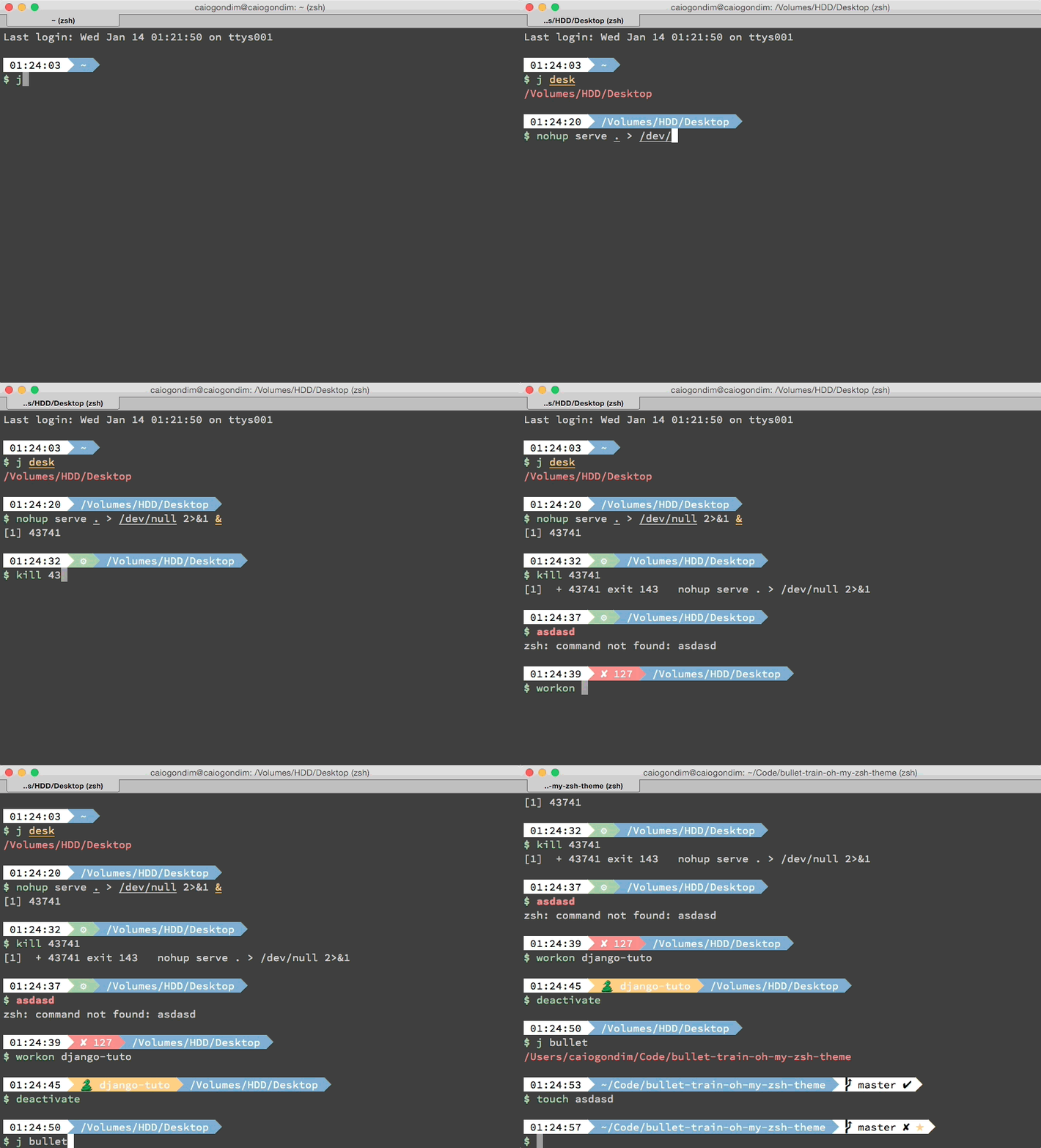
Bullet Train is a [oh-my-zsh shell](https://github.com/robbyrussell/oh-my-zsh)
|
|
theme based on the
|
|
[Powerline Vim plugin](https://github.com/Lokaltog/vim-powerline). It aims for
|
|
simplicity, showing information only when it's relevant.
|
|
|
|
It currently shows:
|
|
- Current Python virtualenv
|
|
- Current Ruby version and gemset, through RVM
|
|
- Current Node.js version, through NVM
|
|
- Git status
|
|
- Timestamp
|
|
- Current directory
|
|
|
|
If you want add some new feature, of fix some bug, open an issue and lets hack
|
|
together.
|
|
|
|
|
|
## Preview
|
|
|
|
|
|
|
|
|
|
## Other color schemes
|
|
|
|
It's better to use Bullet Train with a dark background color scheme. Below you
|
|
can check Bullet Train with some popular dark color schemes.
|
|
|
|
### Solarized Dark
|
|
|
|

|
|
|
|
### Monokai
|
|
|
|

|
|
|
|
### Tomorrow Night Eighties
|
|
|
|

|
|
|
|
### Tomorrow Night Bright
|
|
|
|

|
|
|
|
|
|
## Requirements
|
|
|
|
In order to use the theme, you will first need:
|
|
|
|
* [Vim Powerline patched](https://github.com/Lokaltog/powerline-fonts)
|
|
* [oh-my-zsh](https://github.com/robbyrussell/oh-my-zsh)
|
|
* Make sure terminal is using 256-colors mode with `export TERM="xterm-256color"`
|
|
|
|
|
|
## Installing
|
|
|
|
### For oh-my-zsh users
|
|
|
|
1. Download the theme [here](http://raw.github.com/caiogondim/bullet-train-oh-my-zsh-theme/master/bullet-train.zsh-theme)
|
|
|
|
2. Put the file **bullet-train.zsh-theme** in **~/.oh-my-zsh/themes/**
|
|
|
|
3. Configure the theme in your **~/.zshrc** file:
|
|
|
|
```bash
|
|
ZSH_THEME="bullet-train"
|
|
```
|
|
|
|
### For antigen users
|
|
|
|
Add the following snippet to your **.zshrc** somewhere after the line
|
|
`antigen use oh-my-zsh`.
|
|
|
|
```bash
|
|
antigen theme https://github.com/caiogondim/bullet-train-oh-my-zsh-theme bullet-train
|
|
```
|
|
|
|
|
|
## Options
|
|
|
|
Bullet Train is configurable. You can change colors and which segments you want
|
|
or don't want to see. All options must be overridden in your **.zshrc** file.
|
|
|
|
### Prompt
|
|
|
|
The character used for prompt and if you want to be warned when running as root:
|
|
|
|
```bash
|
|
BULLETTRAIN_PROMPT_CHAR="\$"
|
|
BULLETTRAIN_PROMPT_ROOT=true
|
|
```
|
|
|
|
### Status
|
|
|
|
The status segment background. Shows if the last command exited with error, and
|
|
if there is jobs on background running:
|
|
|
|
```bash
|
|
BULLETTRAIN_STATUS_SHOW=true
|
|
BULLETTRAIN_STATUS_EXIT_SHOW=false
|
|
BULLETTRAIN_STATUS_BG=green
|
|
BULLETTRAIN_STATUS_ERROR_BG=red
|
|
BULLETTRAIN_STATUS_FG=black
|
|
```
|
|
|
|
### Time
|
|
|
|
The time segment background, foreground color and visibility:
|
|
|
|
```bash
|
|
BULLETTRAIN_TIME_SHOW=true
|
|
BULLETTRAIN_TIME_BG=''
|
|
BULLETTRAIN_TIME_FG=''
|
|
```
|
|
|
|
### Context
|
|
|
|
Shows username and machine name when in some different value than default. To
|
|
set the default user use the `BULLETTRAIN_CONTEXT_DEFAULT_USER` variable. To
|
|
show the context segment in when ssh'ing, set the `BULLETTRAIN_IS_SSH_CLIENT` in
|
|
the remote machine.
|
|
|
|
Default values:
|
|
|
|
```bash
|
|
BULLETTRAIN_CONTEXT_SHOW=false
|
|
BULLETTRAIN_CONTEXT_BG=black
|
|
BULLETTRAIN_CONTEXT_FG=default
|
|
# BULLETTRAIN_CONTEXT_DEFAULT_USER
|
|
# BULLETTRAIN_IS_SSH_CLIENT
|
|
```
|
|
|
|
### Python virtualenv
|
|
|
|
Python virtualenv background, foreground color, visibility and the symbol used
|
|
for the segment:
|
|
|
|
```bash
|
|
BULLETTRAIN_VIRTUALENV_SHOW=true
|
|
BULLETTRAIN_VIRTUALENV_BG=yellow
|
|
BULLETTRAIN_VIRTUALENV_FG=white
|
|
BULLETTRAIN_VIRTUALENV_PREFIX=🐍
|
|
```
|
|
|
|
### node.js nvm
|
|
|
|
Node.js background, foreground color, visibility and prefix for the segment:
|
|
|
|
Default values:
|
|
|
|
```bash
|
|
BULLETTRAIN_NVM_SHOW=false
|
|
BULLETTRAIN_NVM_BG=green
|
|
BULLETTRAIN_NVM_FG=white
|
|
BULLETTRAIN_NVM_PREFIX="⬡ "
|
|
```
|
|
|
|
### Ruby RVM
|
|
|
|
RMV backgound and foreground color, visibility and symbol used for the segment:
|
|
|
|
```bash
|
|
BULLETTRAIN_RVM_SHOW=true
|
|
BULLETTRAIN_RVM_BG=magenta
|
|
BULLETTRAIN_RVM_FG=white
|
|
BULLETTRAIN_RVM_PREFIX=♦️
|
|
```
|
|
|
|
### Dir
|
|
|
|
Current directory background, foreground color and visibility:
|
|
|
|
```bash
|
|
BULLETTRAIN_DIR_SHOW=true
|
|
BULLETTRAIN_DIR_BG=blue
|
|
BULLETTRAIN_DIR_FG=white
|
|
BULLETTRAIN_DIR_EXTENDED=true
|
|
```
|
|
|
|
### Git
|
|
|
|
Git background, foreground color, visibility and details:
|
|
|
|
```bash
|
|
BULLETTRAIN_GIT_SHOW=true
|
|
BULLETTRAIN_GIT_BG=white
|
|
BULLETTRAIN_GIT_FG=black
|
|
BULLETTRAIN_GIT_EXTENDED=true
|
|
```
|
|
|
|
Git icons info:
|
|
|
|
```bash
|
|
BULLETTRAIN_GIT_PREFIX=""
|
|
BULLETTRAIN_GIT_SUFFIX=""
|
|
BULLETTRAIN_GIT_DIRTY="✘"
|
|
BULLETTRAIN_GIT_CLEAN="✔"
|
|
BULLETTRAIN_GIT_ADDED="%F{green}✚%F{black}"
|
|
BULLETTRAIN_GIT_MODIFIED="%F{blue}✹%F{black}"
|
|
BULLETTRAIN_GIT_DELETED="%F{red}✖%F{black}"
|
|
BULLETTRAIN_GIT_UNTRACKED="%F{yellow}✭%F{black}"
|
|
BULLETTRAIN_GIT_RENAMED="➜"
|
|
BULLETTRAIN_GIT_UNMERGED="═"
|
|
BULLETTRAIN_GIT_AHEAD=" ⬆"
|
|
BULLETTRAIN_GIT_BEHIND=" ⬇"
|
|
BULLETTRAIN_GIT_DIVERGED=" ⬍"
|
|
```
|
|
|
|
|
|
## Contributors
|
|
|
|
That project was originally a fork from
|
|
[Powerline](https://github.com/jeremyFreeAgent/oh-my-zsh-powerline-theme), but
|
|
most of the code was later erased and its now more closely related to
|
|
[Agnoster](https://gist.github.com/agnoster/3712874). Below is a `git summary`
|
|
of the project:
|
|
|
|
```
|
|
58 Caio Gondim
|
|
33 Jérémy Romey
|
|
7 Jocelyn Mallon
|
|
6 Jérémy Romey
|
|
5 Arthur Wang
|
|
4 Flavius Aspra
|
|
3 Dan Kaplun
|
|
2 itsZero (Chien-An Cho)
|
|
2 wujtruj
|
|
1 yachi
|
|
1 Guillaume BINET
|
|
1 Joe Block
|
|
1 Kevin
|
|
1 Marius Krämer
|
|
1 illuminatis
|
|
1 krischer
|
|
1 m.kuehn
|
|
1 Adrien Brault
|
|
```
|
|
|
|
## Credits
|
|
|
|
This theme is highly inspired by the following themes:
|
|
- [Powerline](https://github.com/jeremyFreeAgent/oh-my-zsh-powerline-theme)
|
|
- [Agnoster](https://gist.github.com/agnoster/3712874)
|
|
|
|
|
|
## License
|
|
The MIT License (MIT)
|
|
|
|
Copyright (c) 2014 [Caio Gondim](http://caiogondim.com)
|
|
|
|
Permission is hereby granted, free of charge, to any person obtaining a copy
|
|
of this software and associated documentation files (the "Software"), to deal
|
|
in the Software without restriction, including without limitation the rights
|
|
to use, copy, modify, merge, publish, distribute, sublicense, and/or sell
|
|
copies of the Software, and to permit persons to whom the Software is
|
|
furnished to do so, subject to the following conditions:
|
|
|
|
The above copyright notice and this permission notice shall be included in all
|
|
copies or substantial portions of the Software.
|
|
|
|
THE SOFTWARE IS PROVIDED "AS IS", WITHOUT WARRANTY OF ANY KIND, EXPRESS OR
|
|
IMPLIED, INCLUDING BUT NOT LIMITED TO THE WARRANTIES OF MERCHANTABILITY,
|
|
FITNESS FOR A PARTICULAR PURPOSE AND NONINFRINGEMENT. IN NO EVENT SHALL THE
|
|
AUTHORS OR COPYRIGHT HOLDERS BE LIABLE FOR ANY CLAIM, DAMAGES OR OTHER
|
|
LIABILITY, WHETHER IN AN ACTION OF CONTRACT, TORT OR OTHERWISE, ARISING FROM,
|
|
OUT OF OR IN CONNECTION WITH THE SOFTWARE OR THE USE OR OTHER DEALINGS IN THE
|
|
SOFTWARE.
|